You have probably heard “Hey Google” a million times. But using Google Assistant to check the weather on your phone is one thing. Using it to control your entire house is something else entirely. Google Home and Nest devices bring that magic into your living room, kitchen, and bedroom right here in Ghana.
Google Home is the smart ecosystem that connects everything. The brains of the operation live inside Google Nest speakers and displays. You talk, Google listens, and your home responds. You can play music, lock doors, close curtains, and turn off the AC without lifting a finger.
Pro Tip: You do not need to tear down your walls or hire an electrician to get started. Most Google-compatible devices just plug into your existing sockets or screw into your current light fittings.
Which Google Nest Devices Can You Buy in Ghana?
At SmartHome.com.gh, we bring genuine Google Nest devices straight to your door with nationwide delivery. Here are the top choices.
Google Nest Mini (2nd Gen): Starting from ₵900
This is the perfect entry point. It is small, affordable, and surprisingly loud. The Nest Mini gives you full voice control for all your smart devices.
- Stream music from YouTube Music, Spotify, or Apple Music
- Set timers, alarms, and reminders
- Answer questions via Google Search
- Control your smart lights, locks, curtains, and plugs
Pro Tip: Buy two Nest Minis and put them in different rooms. You can broadcast messages like “Dinner is ready” to the whole house, which is much easier than shouting up the stairs.
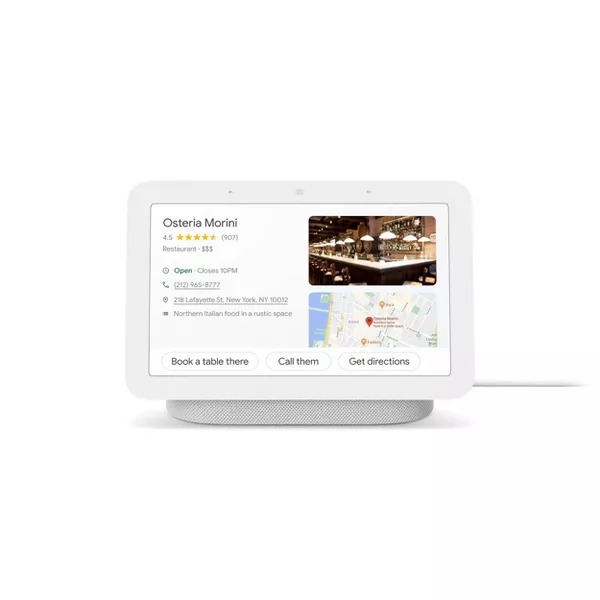
Google Nest Hub (with 7-inch Display)
Want to see your calendar, security camera feeds, and YouTube videos? The Nest Hub adds a touchscreen to the mix. It is perfect for the kitchen to follow recipe videos step-by-step. Or keep it in the bedroom to set alarms visually and check the Accra weather at a glance.
Setting Up Google Home in Ghana
Setting up your Google Home is incredibly simple. Here is what you need to know.
Power and Internet
Google Nest devices use standard power adapters. They work perfectly with Ghana’s 230V power supply right out of the box. No converter needed.
You need a stable internet connection. We recommend at least 5 Mbps. If your WiFi is spotty, grab a TP-Link AC1200 WiFi Extender to eliminate dead zones before you start.
Step-by-Step Setup
- Plug in your Google Nest device.
- Download the Google Home app on Android or iOS.
- Connect to your WiFi network.
- Add your smart plugs, lights, switches, or locks.
- Create routines like “Good Morning” to turn on the lights and read your schedule.
Pro Tip: Create a custom routine for the phrase “Hey Google, I am leaving”. It can automatically turn off all your lights and arm your security system in one go.
Budget Guide: How Much to Spend?
A smart home does not have to break the bank. Here is a realistic budget guide for your Google Home setup.
Starter Setup (Under ₵1,000)
Get 1x Google Nest Mini for around ₵900. This is the perfect way to test out voice control, music, and smart home basics.
Smart Home Essentials (₵1,000 to ₵3,000)
Combine a Nest Mini with two Smart Light Bulbs (from ₵150 each) and a Smart Plug (from ₵120). For approximately ₵1,320, you get voice-controlled lights, scheduled appliances, and energy savings.
Full Smart Home (₵3,000+)
Invest in a Google Nest Hub (from ₵2,000), a Smart Door Lock (from ₵1,200), and Smart Curtain Motors. You get a complete voice-controlled home spanning security, lighting, curtains, and convenience.
Pro Tip: Focus on convenience first. A smart plug on your bedroom fan and a smart bulb in your lamp will change your life for under ₵300.
Google Home and Dumsor: What Happens During Power Cuts?
When ECG cuts the power, your Google Nest goes offline. But your home stays smart and secure.
- Battery-powered sensors like door and window alarms keep working.
- Your smart lock runs on batteries, so it stays locked even without power.
- All your routines and settings are saved in the cloud. When power returns, everything reconnects automatically.
Read more: How to Keep Your Smart Home Smart When ECG Goes AWOL
Pro Tip: A small UPS backup (₵200 to ₵500) can keep your Nest and router running for hours, giving you continuous voice control during dumsor.
Frequently Asked Questions
Does Google Assistant understand Ghanaian accents?
Yes. Google’s voice recognition is excellent. Set it to standard English and it will understand your commands easily.
Can I use Google Home without internet?
No, Google Assistant requires an active internet connection to process voice commands. But your smart locks and battery devices will still work manually.
Is Google Home compatible with Tuya devices?
Yes. Most smart devices on SmartHome.com.gh are Tuya-compatible, and Tuya works seamlessly with Google Home. Connect them once in the app, and you are done.
Can I control my home from my phone when I am at work?
Absolutely. The Google Home app lets you control all connected devices remotely, anywhere you have internet access.
Ready to Build Your Smart Home?
Start your smart home journey today. We have Google Nest devices and compatible accessories available right now on SmartHome.com.gh with nationwide delivery.
Shop our full range of smart devices
Got questions? Chat with us directly on WhatsApp: +233 55 050 7788
Related Articles: